Claimed your dealership in ChatGPT? Now test the inventory question
OpenAI’s new Business Hub lets a dealership correct its store details and see how often ChatGPT shows it. A shopper who asks for a specific car still needs your current vehicles, accurate prices and a way to contact the store.
What OpenAI launched
On November 10, 2026, OpenAI introduced Businesses in ChatGPT as a beta. A new Business Hub in the ChatGPT sidebar lets a business claim its listing, update its details and see aggregated insights about how people find it in ChatGPT. OpenAI puts ChatGPT’s audience at 1.2 billion people a week.
The same announcement added Business Agents: a separate, labeled chat in which a customer can ask a business about its products. OpenAI opened them first to eligible ecommerce and online service businesses in the United States. Claiming a listing, publishing an agent and advertising in ChatGPT are separate programs, and a dealership can claim its listing without the other two.
Claim each rooftop’s listing
OpenAI’s help article describes the steps. Someone who owns the business or is authorized to represent it does the following:
- Sign in to ChatGPT, open Business Hub from the sidebar and search for the dealership by name.
- Select the listing that matches the rooftop and confirm the ChatGPT account that will manage it. Use an account the dealership controls, so access does not leave with one employee.
- Verify with one of the offered methods, such as the business phone, a business email address or the website domain. Domain verification needs a TXT record in DNS, so the website provider or IT contact may have to add it.
- Wait for OpenAI’s review, then complete identity verification with Persona. You cannot publish changes or view insights until Persona verification is approved. The blue verified check appears after that approval.
Local stores can currently claim only an existing U.S. listing. Each brand is managed separately, and claiming a main brand does not claim its locations. A dealer group should list every rooftop, the account that will claim it and the person responsible. The admin who claimed a listing can add teammates and give an agency access.
After approval, you can edit the website, description, category, logo and cover photo. OpenAI reviews each change before it is published, and ChatGPT may still use other sources when it answers questions about your store.
Source: OpenAI Help Center, Setting up your business on ChatGPT.
What the profile leaves out
The fields OpenAI lists for a claimed profile describe the store. Shoppers usually ask about a car, in words like these:
“Find me a used SUV under $30k with a third row near Dallas.”
To answer with one of your vehicles, ChatGPT needs that specific car, today’s price and whether it is still for sale. Your business description cannot carry those facts for a lot that changes every day.
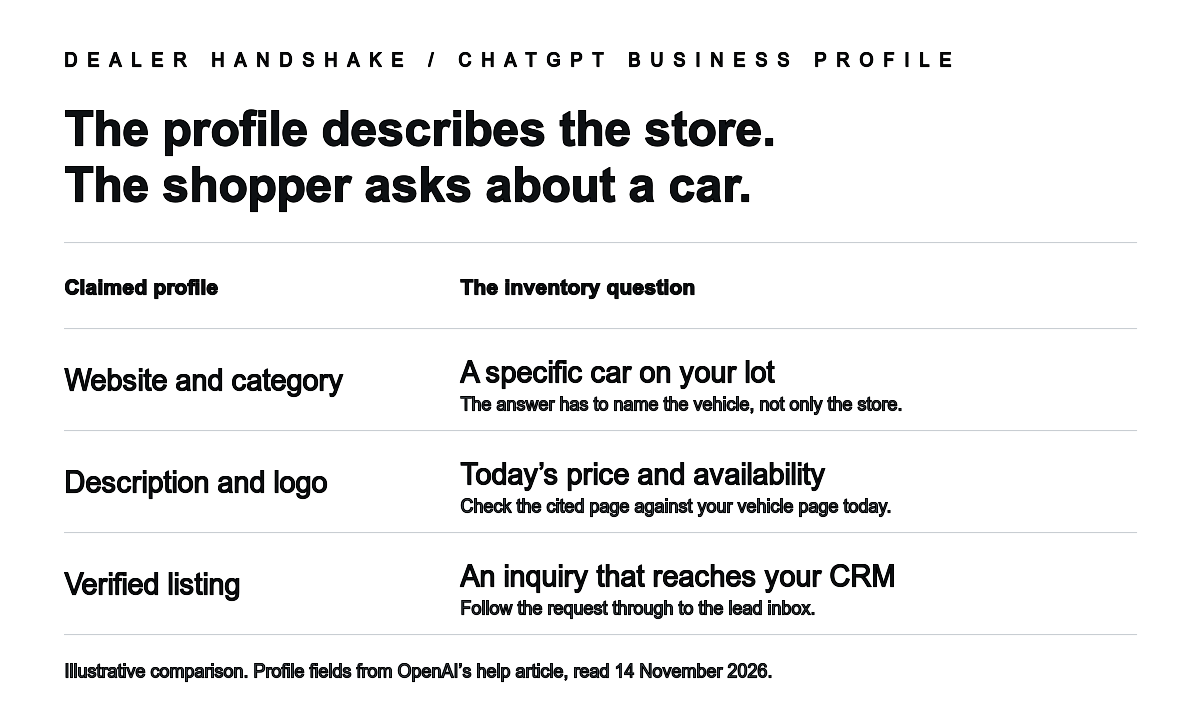
Business Hub also accepts product feeds with prices and availability. OpenAI describes these feeds for retailers and Shopify merchants, and every product in a feed must follow its Commerce policies. None of the OpenAI pages we read on November 14 mention vehicle inventory. Confirm with OpenAI support before you plan around a used-vehicle feed in Business Hub.
Business Agents also stop before the sale. According to OpenAI’s help article, an agent can explain products and policies and link to the business website. Purchases and bookings happen on that website.
Sources: OpenAI Help Center, Setting up your business on ChatGPT; OpenAI Commerce policies, updated September 29, 2026; OpenAI Business Agents Policy, updated November 10, 2026.
Follow one shopper question to the CRM
Open a fresh ChatGPT conversation and ask a question that one of your current cars should answer. Include your city, a price ceiling and one equipment requirement. Then follow every step a shopper would take.
| Step | What to check | What to record |
|---|---|---|
| The answer | Does a vehicle from your lot appear? Which page does ChatGPT cite for it? | Date, exact question, answer text and cited links. |
| Price | Does the price match your vehicle page today? | VIN, both prices and any fees shown. |
| Availability | Is the car still for sale? Also ask about a car you sold last week. | Whether the sold car still appears, and from which source. |
| The link | Does the link open that vehicle’s page or only your homepage? | The URL the shopper lands on. |
| Next step | Can the shopper send an inquiry or a test-drive request about that car from the page? | Which form or tool, and whether the request names the vehicle. |
| CRM | Does the request reach the right store’s CRM with the vehicle attached? | Lead source, time received and who it was assigned to. |
Ask the same question again a few days later. ChatGPT can give a different answer to the same words, so a single result cannot show where your store stands. A test-drive request is still a request: the store confirms the time with the shopper.
Read the insights for what they count
After Persona approval, Business Hub shows activity for the past 28 days. For a local business, OpenAI counts a mention when ChatGPT shows a result for that location, even if the person never opens the listing or visits the website. The page also reports website clicks and discovery topics, which group the themes of answers that mentioned or cited the business.
Businesses do not receive individual prompts or conversations. A metric can stay blank until activity reaches OpenAI’s reporting threshold, so a blank field does not mean zero. Put the mention and click counts next to your website analytics and the lead sources in your CRM. Count inquiries and kept appointments from ChatGPT visitors as the result that matters to the store.
Source: OpenAI Help Center, Setting up your business on ChatGPT.
Where Dealer Handshake fits
The free Dealer Handshake website scan reads your website without running its scripts and reports what that method can see, with the evidence for each check. Its readability score is not a search ranking, and it cannot tell you whether ChatGPT will recommend your store.
For the inventory question, Dealer Handshake provides a managed connection: an authorized inventory feed, search across participating dealerships through Car Handshake, and shopper-approved inquiries delivered to your existing CRM’s ADF lead inbox. Each AI assistant decides whether and how it uses a connection. Our guide to making your cars searchable in ChatGPT and the ten-VIN test show how to check the result with your own vehicles.
If you want to see the table above run against your inventory, ask us for a demonstration with your own cars.
Prepared with AI assistance. Published 14 November 2026 from OpenAI’s November 10 announcement, its help article and its Commerce and Business Agents policies as read on 14 November 2026. Businesses in ChatGPT is in beta, and OpenAI may change its features. Dealer Handshake sells inventory connections and visibility services. This article reports no new study or customer outcome.